
Wizardo Casino Withdrawal and Deposit
At Wizardo Casino, you can manage your account payments through the Wallet area. This section brings together the deposit, withdrawal and transaction history tabs, so you can top up your balance, request funds and check previous transactions in one place.
We work with selected payment methods to provide clear and secure transactions. The availability of each option may depend on the currency, country, selected method and account status.
How the Wallet area works at Wizardo Casino
The Wallet area is available from the profile menu. Inside this section, you can switch between Deposit, Withdrawal and History, depending on the operation you want to complete.
In the deposit tab, you choose the method and amount to top up your account. In the withdrawal tab, you select the available option to receive funds. In the history section, you can track previous operations with filters that help you find specific transactions.
How to make a deposit at Wizardo Casino
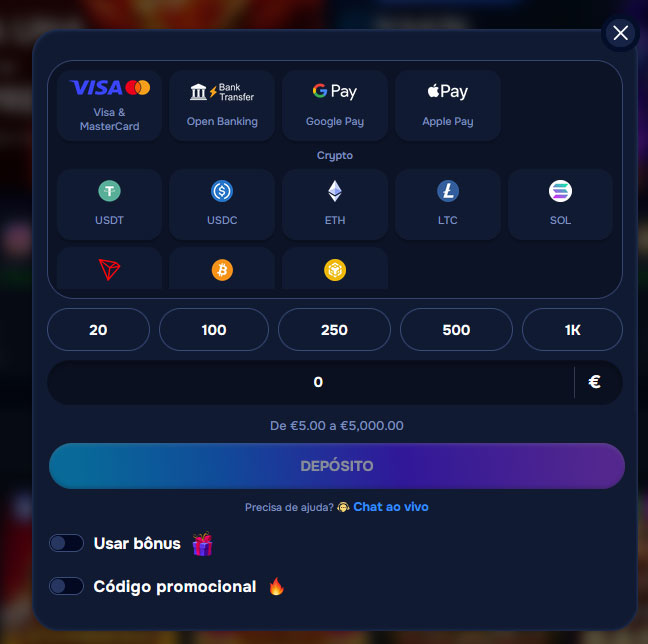 To deposit, log in to your Wizardo account, open the profile menu and select Wallet. Then choose Deposit, select the payment method, enter the amount and confirm the transaction.
The deposit range shown is €5 to €5,000. To make the process faster, you can use quick amount buttons such as €20, €100, €250, €500 and €1K, when they are available in your account.
Available deposit methods
| Category | Methods |
|---|---|
| Cards | Visa & MasterCard |
| Bank and Open Banking | Open Banking, Sparkasse, Deutsche Bank, Commerzbank, Volksbanken Raiffeisenbanken |
| Digital payments | Google Pay, Apple Pay |
| Cryptocurrencies | USDT, USDC, ETH, LTC, SOL, TRX, BTC, BNB, TON |
| Other options | Bitcoin, CashtoCode, ecoPayz, Ethereum, eZeeWallet, Flexepin, Jeton, Litecoin, MB, Neosurf, Ripple |
The final list of methods appears on the deposit page of your account. Some options may be unavailable depending on the region, selected currency or requirements of the payment system itself.
Bonus and promotional code during deposit
During the deposit process, you may find options such as Use the bonus and Promotional code. These options must be configured before confirming the payment, because the promotion can only be applied according to the rules of the active offer.
Before accepting a bonus, read the relevant conditions. Promotions may have wagering requirements, validity periods, maximum bet limits and their own rules for withdrawing winnings.
Supported currencies
The official supported currencies are EUR, PLN, USD, ZAR and ARS. The currency available for payment may depend on the account settings and selected method.
When the transaction is made in euros, the values are shown in EUR. If you use another supported currency, confirm the final amount before sending the deposit or withdrawal request.
How to withdraw money at Wizardo Casino
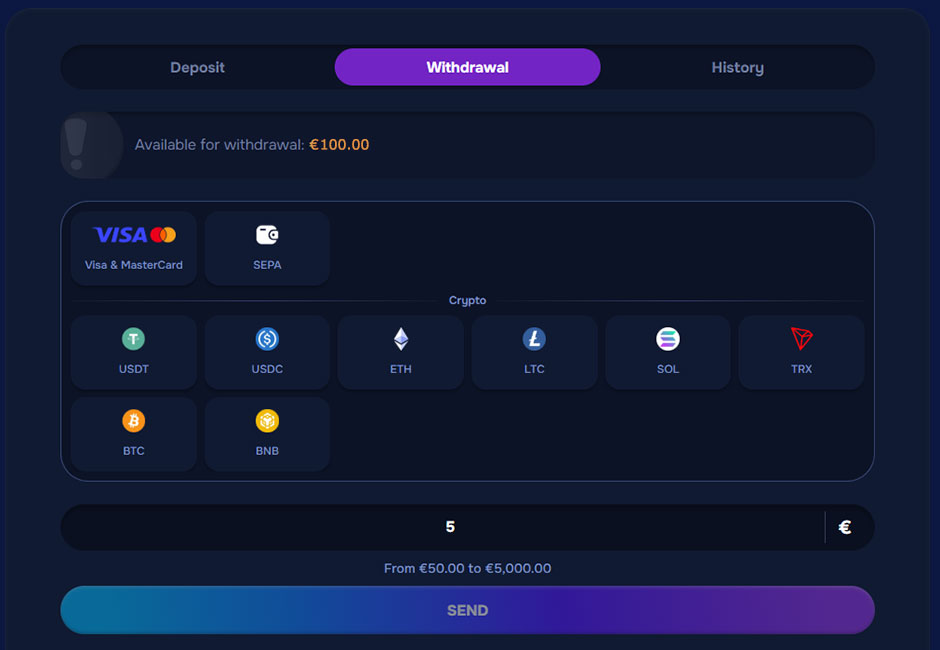 To withdraw funds, open Wallet in the profile menu and select the Withdrawal tab. Then choose the available method, fill in the required fields, enter the amount and submit the request.
The withdrawal area shows the Available for withdrawal amount, so you can see how much you can request. The displayed withdrawal range is €50 to €5,000, subject to the selected method, account status and required checks.
Available withdrawal methods
| Category | Methods |
|---|---|
| Cards | Visa & MasterCard |
| Bank transfer | SEPA |
| Cryptocurrencies | USDT, USDC, ETH, LTC, SOL, TRX, BTC, BNB |
Withdrawals are processed through the methods available in your account. When necessary, we may request additional confirmation to ensure that the request belongs to the account holder.
Rules before requesting a withdrawal
Before requesting a withdrawal, confirm that the applicable wagering requirements have been completed. A request will not be processed while there are pending wagering conditions or bonus funds still locked by promotional terms.
- We may request KYC verification before withdrawal, especially for the first request.
- The payment method must belong to the Wizardo account holder.
- Payments made by third parties are not allowed.
- Bonus funds cannot be withdrawn before the promotion conditions are completed.
- The deposit must be wagered before it can be withdrawn, according to financial security rules.
As a general rule, the deposit must be wagered 3 times before a withdrawal. In specific cases, this requirement may be adjusted by the company, but it cannot be lower than 1 time the deposited amount.
Transaction history
The History tab allows you to track deposits, withdrawals and other account operations. You can use filters such as Date from, Date to, Amount from, Amount to, Sort by, Type and Transactions status.
After choosing the filters, use Search to look for transactions. To remove the selected criteria and start a new search, use Clear. If there are no results for the applied filters, the page may indicate that no transactions were found.
Problems with deposits or withdrawals
If a deposit does not appear in your balance, first confirm that the transaction was completed through the payment method used. If the amount is still missing, contact customer support so that we can check the transaction.
If a withdrawal is pending or cannot be submitted, check the account status, KYC completion, wagering requirements, payment method ownership and the status of any active bonus. For help during the process, you can use Live Chat or contact support through the official email shown in the account help area.
FAQ
What is the minimum deposit at Wizardo Casino?
The minimum deposit amount shown is €5. The maximum amount shown is €5,000, but limits may vary depending on the payment method, currency and account conditions.
What is the minimum withdrawal amount?
The displayed withdrawal range is €50 to €5,000. Before confirming the request, always check the limit shown for the selected method, because some systems may apply their own conditions.
Which methods can I use to deposit?
You can use options such as Visa & MasterCard, Open Banking, selected banks, Google Pay, Apple Pay and cryptocurrencies. Methods such as CashtoCode, ecoPayz, eZeeWallet, Flexepin, Jeton, MB, Neosurf and Ripple may also be available.
Which methods can I use to withdraw?
For withdrawals, Visa & MasterCard, SEPA and selected cryptocurrencies are available. The listed crypto options include USDT, USDC, ETH, LTC, SOL, TRX, BTC and BNB.
Do I need to verify my account before withdrawal?
Yes, we may request KYC verification before processing withdrawals, especially for the first request. Verification may include an identity document, proof of address, bank statement or proof of ownership of the payment method.
Can I use another person’s payment method?
No. All methods used for deposits and withdrawals must belong to the Wizardo account holder. Third-party payments are prohibited and may result in the deposit being returned, the transaction being blocked or winnings being cancelled according to the applicable rules.
Where can I see my payment history?
You can check the history in the History tab inside the Wallet area. This page allows you to filter transactions by date, amount, type, order and status, helping you track deposits and withdrawals in a more organized way.